
Daykept's template gallery: ready-made structures for every kind of writing
Browse 47 journal templates by theme (14 are free), save the ones that fit, and never face a blank page again.
Creating a journaling template from scratch takes thought you might not have on a Tuesday morning. The Template Gallery solves that: a curated library of ready-made structures, organized by how you work and what you need. Browse, save the ones that fit, and start writing in under a minute.
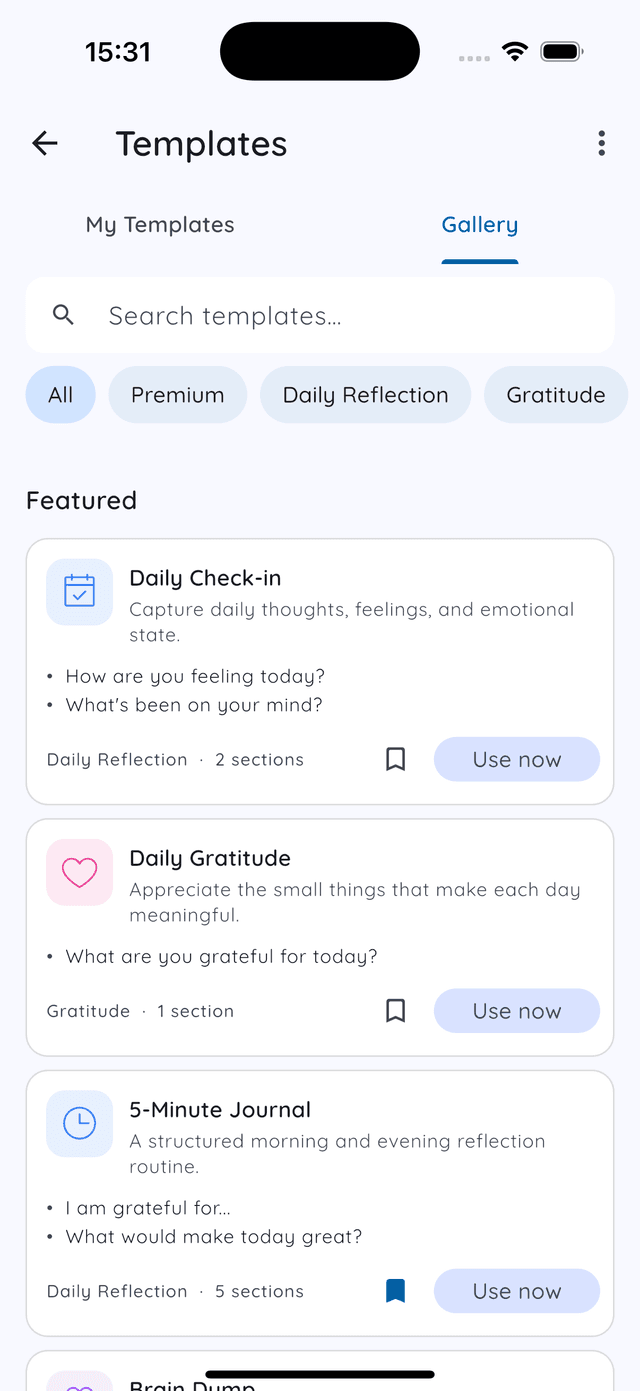
My Templates vs Gallery
The Templates screen has two tabs at the top: My Templates and Gallery.
My Templates shows the templates you have saved or created yourself, the ones you reach for when writing a new entry. Keep this list short. Five well-chosen templates you actually use are worth more than twenty you scroll past.
Gallery is the browsable library. This is where you find new templates to try. When something looks useful, tap the bookmark to save it to My Templates, or tap Use now to open a new entry with it immediately.
Searching and filtering
The search bar at the top of the Gallery lets you find templates by keyword. Useful when you know what you need but do not want to scroll through every category.
Below the search bar, chips narrow the gallery by theme: Daily Reflection, Gratitude, Emotions, Health, Reviews and more. There are 47 templates in total. Fourteen are free, including everything you need to write every day: morning, evening, gratitude, mood, a weekly review and a brain dump. The other 33 are Premium (monthly reviews, goals, travel, creative writing) and free for everyone during early access. The Premium chip shows just those.
Templates for hard days
The Emotions group is always free. Nobody should have to pay to write their way through a bad day. Four worth knowing:
- Anxiety Release. Get the worries out of your head and onto the page, then sort what you can act on from what you can let go.
- Anger Journal. Name what happened and what you felt, before deciding what, if anything, to do about it.
- Grief & Loss. A gentle structure for remembering someone or something you have lost.
- Unsent Letter. Say everything you could not say out loud, to someone who will never read it.
These pair well with the mood you pick at the start of every entry: over a few weeks, your mood calendar shows when the hard days cluster.
The 14 free templates
Each has its own page with the exact questions and a filled-in example:
- Daily Check-in
- Morning Intentions
- Evening Wind-Down
- 5-Minute Journal
- Daily Gratitude
- Anxiety Release
- Anger Journal
- Grief & Loss
- Unsent Letter
- Mood Journal
- Self Check-in
- Weekly Review
- Brain Dump
- Free Writing
Picking the right template
When browsing the Gallery, resist the urge to save everything that looks interesting. A saved template you do not use clutters My Templates and makes it slower to reach the ones you do use.
Instead: save one template from a category, use it for a week, then decide. If the format feels right, keep it. If you keep skipping fields or finding it too rigid, try a different one, or edit it to fit how you actually think.
Use now vs Save
Use now opens a new entry immediately with the template pre-filled. Good when you see exactly what you need and want to start writing right away.
Save adds the template to My Templates without opening a new entry. Good when you are browsing and building your collection for later use.
You can do both: save a template and also use it now. It will appear in My Templates for future entries.
Already comfortable with templates and want to create your own? Read how Daykept's template system works. Or, once your entries are building up, see how the Report screen shows your writing habits over time.
Try Daykept, a gentle journal built around how you feel
Free to download. Writing is free forever. No account needed to start.
Learn more →