
Journal templates in Daykept: stop staring at a blank page
A template that takes 60 seconds beats a perfect entry you never write. How to use and create templates in Daykept.
Some journaling days, you know exactly what you want to say. Other days (tired, busy, head empty) you open the app and have nothing. Templates exist for those second days. They are a structure you fill in rather than a blank you stare at.
Daykept has a built-in template system. You can use templates that already exist or create your own. Either way, the idea is the same: when you do not want to think, the template does the thinking for you.
Where to find templates
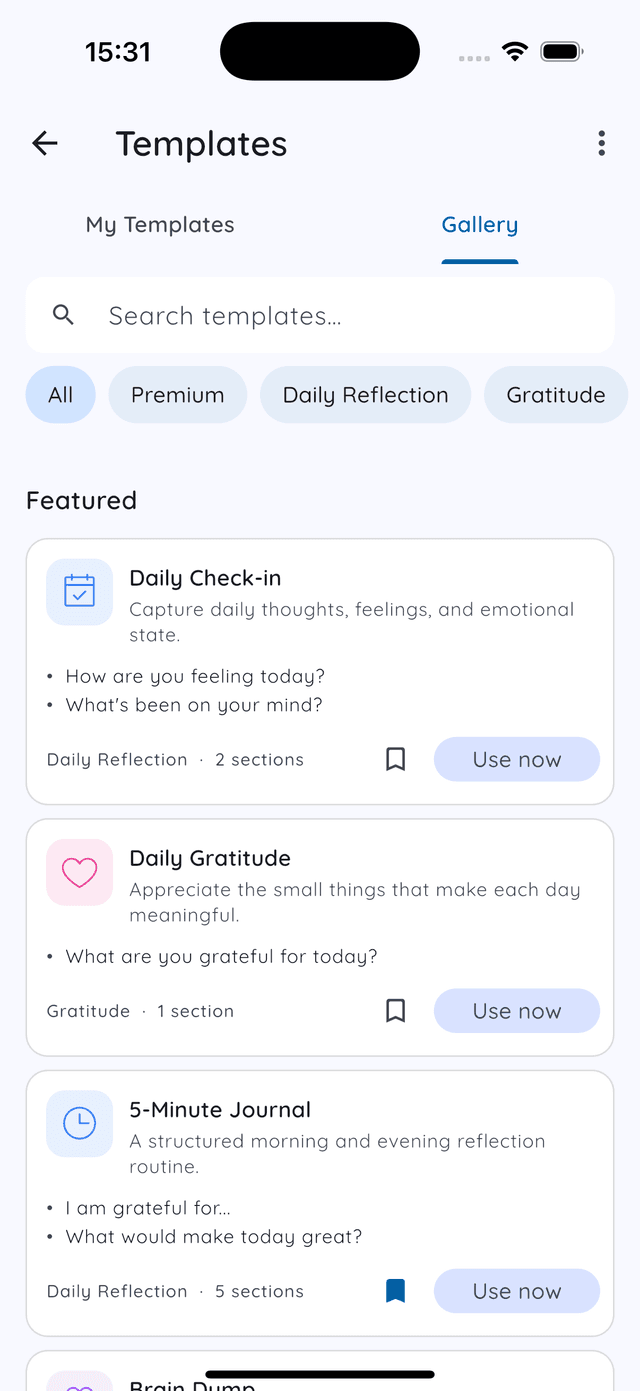
Tap Settings in the bottom bar, then Templates. You get two tabs: My Templates (the ones you saved or made) and Gallery (47 ready-made templates by theme; 14 are free, the rest Premium · free during early access).
Using a template when writing
Tap + to start a new entry. While the page is still blank, Daykept shows the templates you used most recently (the ones used in the same notebook come first), plus a button to pick any other. Tap one and it fills the page. You can also add a template later from the entry's quick actions, next to Image, Camera and Voice.
Once added, the template's sections and questions appear in your entry. Fill in each field, skip what does not apply, and save. A three-field template takes about sixty seconds.
Template ideas that actually work
The best templates are short. Anything longer than five fields becomes a form to avoid, not a structure to reach for. Here are three simple formats worth trying:
- Evening check-in. One thing that happened. One thing I am leaving behind. One intention for tomorrow. That is it: three lines.
- Morning focus. What I want to accomplish today. One thing I am grateful for. How I am feeling right now (one word or emoji is enough).
- Work log. What I finished. What is still open. One decision I made and why. Useful for days when work bleeds into everything else.
Templates as a floor, not a ceiling
The purpose of a template is to get you started, not to limit what you write. If you fill in the first field and find yourself writing three paragraphs, that is fine. The template did its job: it removed the activation energy required to begin.
On days when you have a lot to say, ignore the template entirely. On days when you have nothing, use it. A structured entry on a tired Wednesday is worth more than a skipped day waiting for inspiration.
Keeping your templates useful
Start with one template and use it for two weeks before creating more. If it feels right, keep it. If it feels like a chore, adjust it. A template you actually use beats a library of templates you always mean to try.
New to Daykept? Read how to build a daily journaling habit first. Once you have entries, learn to organize them with tags and notebooks.
Free templates for this: 5-Minute Journal, Evening Wind-Down, Brain Dump. Each one has the exact questions, a filled-in example and how to open it in Daykept.
Try Daykept, a gentle journal built around how you feel
Free to download. Writing is free forever. No account needed to start.
Learn more →