
Track spending day by day with Cashvelope's calendar
See what you spent on every day of the month, your month's totals, and upcoming bills, then tap a day to see exactly where the money went.
The report shows the month as a whole; the transaction list shows every entry. The calendar sits in between: your spending laid out as a month, so heavy days, quiet days and no-spend streaks jump out without reading a single number.
What the calendar shows
Tap Calendar in the bottom bar. Each day shows its total: spending days in red, days with income in green, and nothing at all on days you didn't spend.
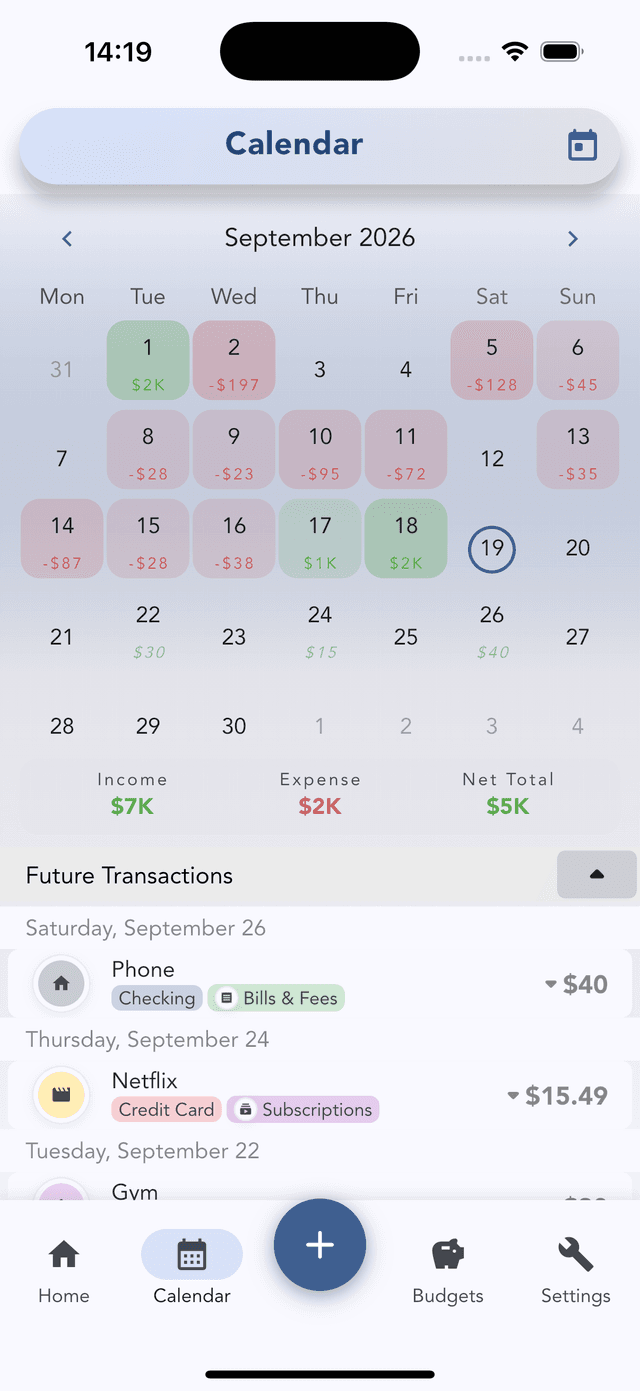
Under the grid you get the month's Income, Expense and Net total, and a list of Future transactions (recurring bills and anything you logged with a future date), so you can see what's still coming this month.
Tap a day to see where the money went
Tap any day and the list below switches to that day's transactions. Tap the same day again to go back to the whole month. Tap a transaction to edit it.
That's the fastest way to answer "what did I spend on Saturday?" It also helps you find the one purchase you remember roughly but can't find by name.
Move between months
Use the arrows to go back or forward a month; Today jumps back to the current one. Past months work the same way, which makes the calendar useful for spotting patterns: payday weekends, the week before a trip, the days after a big bill.
Three ways to use it
- No-spend days. Empty days are wins you can see. Try to beat last month's count.
- Find the leak. If the report says a week was heavy, open that week here and tap each day.
- Check upcoming bills. Before a weekend out, glance at Future transactions. Rent or an annual renewal might land before payday. Keep them in one place with the subscription audit.
Calendar, Report or Home?
- Home: how is this month going, right now?
- Calendar: what happened on a specific day, and which days were heaviest?
- Report: what did the whole month (or year) look like, and how does it compare with a typical month?
The calendar is only as complete as your entries, so log right after you pay.