
Notebook Timeline: see your journal as one journey
A list shows entries. A timeline shows a story. How Daykept's Notebook Timeline lays out a notebook by day and month, with milestones and breaks marked.
A journal list is good at one thing: showing your latest entries. Scroll far enough and it becomes a wall of text, where last March looks exactly like last week.
But a notebook isn't just a pile of entries. A travel journal is a trip. A notebook about your kid is their childhood. A work log is a project, start to finish. It's a story, and a list is the wrong shape for a story.
That's the idea behind Notebook Timeline, new in Daykept 1.7.
From a list to a journey
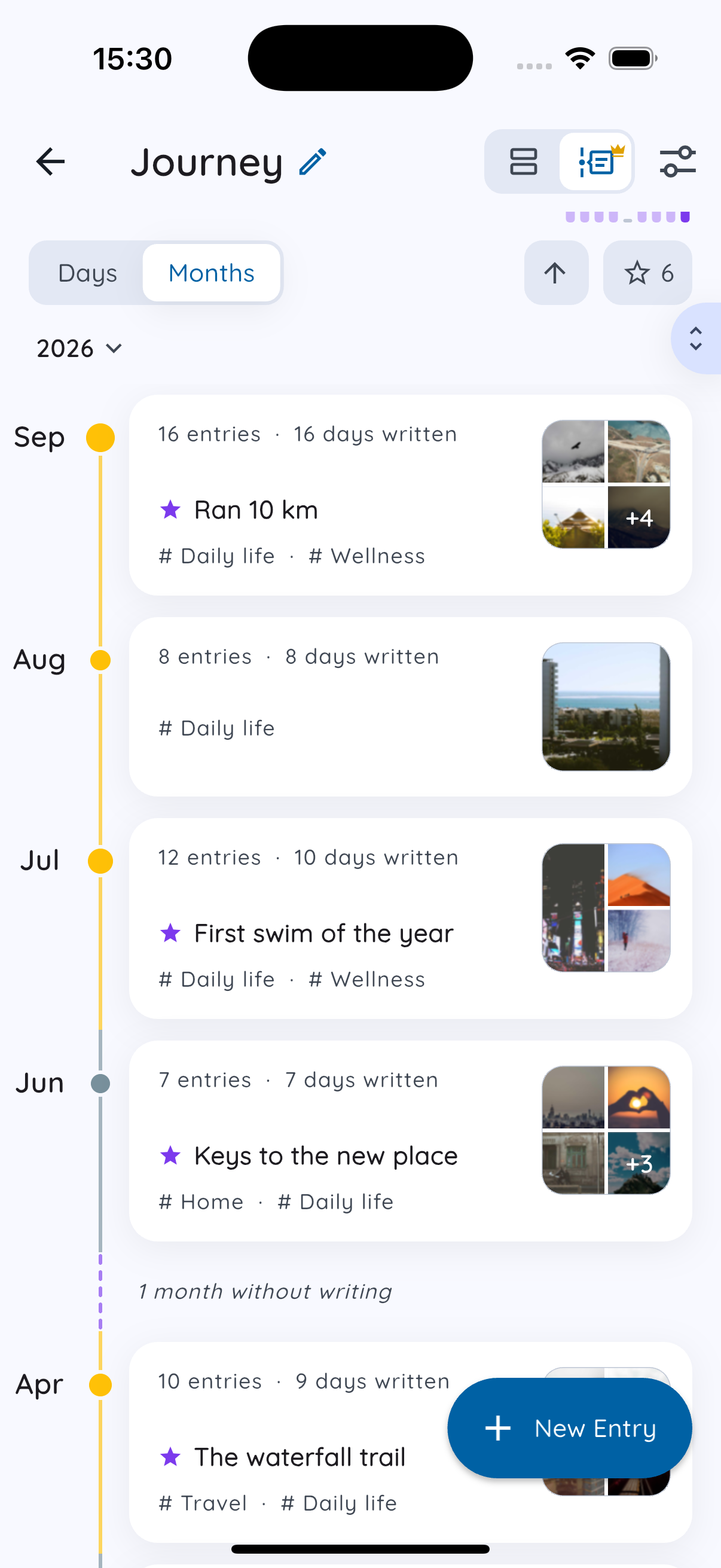
Open any notebook and switch from List to Timeline at the top. The same entries are laid out along a line, oldest to newest, so you can see the shape of the whole thing:
- Days or Months. Read entry by entry, or zoom out to months: how many entries, how many days you wrote, the milestones, a few photos.
- Breaks are marked. When you stopped writing for a while, the timeline shows it: "1 month without writing." The gaps are part of the story too.
- Moods along the line. Each entry's dot takes the color of the mood you picked, so you can see the emotional shape of a trip or a year at a glance.
- Jump anywhere. Go straight to any month, or back to the top in one tap. Or start from the start and read it like a book.
Milestones: the entries that matter most
Some entries are turning points: the first day of the trip, the new job, the day everything changed. Star an entry from its menu and it becomes a milestone, marked with a star on the timeline.
Switch to Milestones to see only those, each shown large with its photo, like a highlights reel of a notebook.
Ideas for timeline notebooks
Timeline shines when a notebook has a clear subject:
- A trip: from packing to coming home.
- A child's early years: first words, first steps, ordinary afternoons.
- A project or new job: how it started, the hard weeks, where it ended up.
- A health journey: training for a race, recovery, a new habit.
- A year: one notebook for 2026, read back in December.
Not sure how to split your notebooks? See how to organize a journal with tags and notebooks.
Is Timeline free?
Notebook Timeline is part of Premium, free for everyone during early access.
The list view stays free, always, and it shows every entry. Timeline is a different way to look at your journal, not a lock on it. If Premium ever ends, your notebook simply goes back to the list. Nothing is lost.
Two ways to look back
Timeline is one way Daykept brings your past back. The other is On This Day, which shows what you wrote on this date in past years. One tells the whole story; the other surprises you with a single page from it. See why rereading old entries matters.
Try Daykept, a gentle journal built around how you feel
Free to download. Writing is free forever. No account needed to start.
Learn more →