
A travel journal that remembers where you wrote it
Keep a travel journal on your phone that saves the city for each entry, then reread any trip city by city. Free, city level only, off until you turn it on.
Most travel journals don't survive the trip. The paper notebook stays in the bottom of the backpack, the notes app fills up with half sentences, and by the flight home you've stopped writing. Six months later you remember the trip, but not the Tuesday in Lisbon when it rained and you found the best café of your life.
A travel journal doesn't need to be beautiful to be worth keeping. It needs two things: it has to be quick enough to write in at the end of a long day, and it has to bring the trip back when you want to reread it. Knowing where you wrote each entry does a lot of the second job for you.
Why the place matters as much as the date
Dates are how journals are organized. Places are how memory works. Ask yourself what you did in the second week of last March and you'll draw a blank. Ask what you did in Chicago and the whole weekend comes back.
When every entry carries its city, you can reread your life in a different order:
- A trip, start to finish. Everything you wrote in Kyoto, without scrolling past the weeks before and after.
- A place you keep going back to. Every Thanksgiving at your parents' house, side by side, years apart.
- The map of a year. How many cities you actually wrote from, which surprises most people.
A travel journal routine that survives the trip
Keep it small. Long, polished entries are why trip journals stop on day three. Try this instead, every evening:
- Pick how today felt. In Daykept every entry starts with a mood, so even a one-line day leaves a mark.
- Write one moment, not the itinerary. Not "visited the cathedral", but the old man feeding pigeons on the steps.
- Add one photo. The one you'd actually want to see again, not the one for the group chat.
- Note one thing you want to remember. A word in the local language, a dish, a street name.
That's five minutes, even after a 20,000 step day. The location takes care of itself.
How location works in Daykept
Location in Daykept is off until you choose it, and it only ever saves the city.
- Add it to one entry. Under the date of an entry, tap Add location, then Use current location. Your phone asks for permission the first time.
- Or search for a place. Choose Search for a place and type a city. Handy for an entry you write on the train home about where you've just been, and it needs no location permission at all.
- Or let new entries pick it up. Go to More → Settings and turn on Add location to entries. This only applies to entries dated today, so an entry you write later about last week doesn't get stamped with wherever you happen to be now.
Only the city, the country and an approximate position (within about 1 km) are saved. Never a street or an exact address. Tap the city while editing to change it or remove it.
Places: every city you've written from
Once a few entries have a city, open More → Places. You'll see a summary at the top (something like 5 countries · 6 places · 97 entries), then your cities grouped by country, each with how many entries you wrote there and over which months.
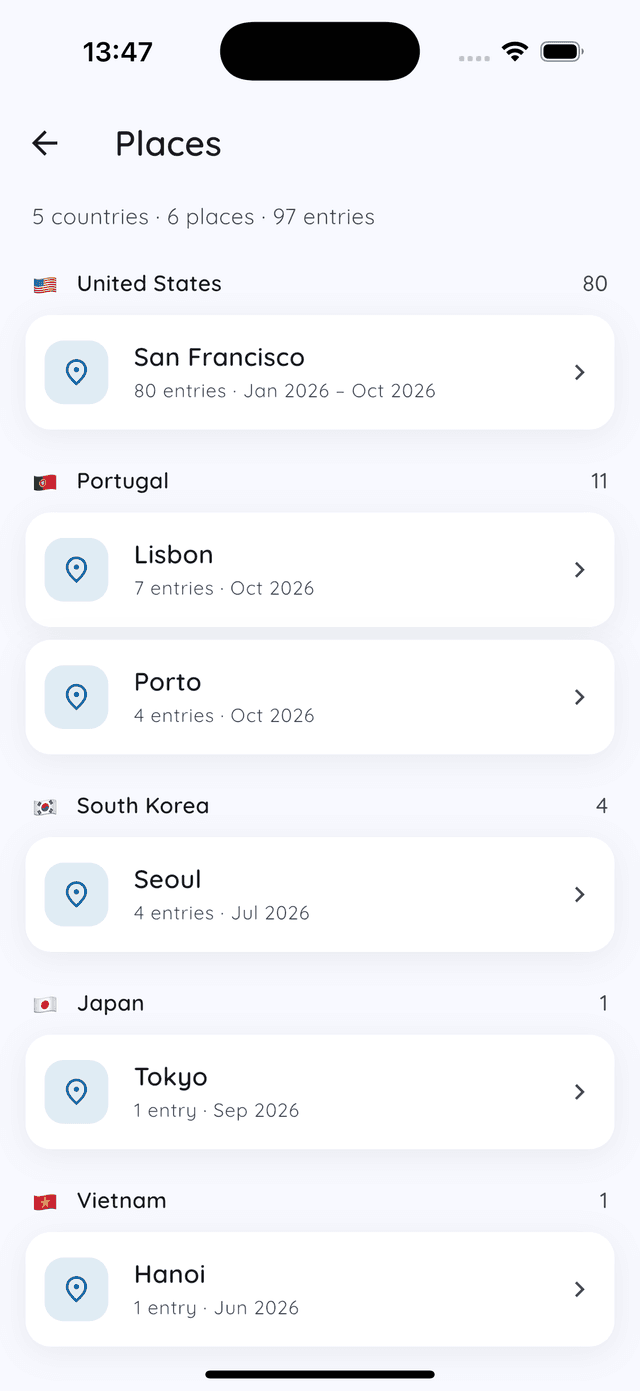
Tap a city to see every entry written there. You can get to the same list from the entry itself: the city shows on each entry in your lists, and tapping it (or the place under the date while you're reading) opens everything else you wrote in that city.
You can also just search. Type a city name in Search and Daykept finds the entries written there.
Turn a trip into one story
A week of short entries is great to write and a little scattered to reread. In a city's list, long-press an entry, tap the others you want, then tap Combine. Daykept makes one new entry out of them:
- It starts with an empty section for your own summary of the trip.
- Then each entry follows in date order, under its date and title.
- Photos and voice recordings come along, and tags are pooled.
- The entries you picked stay exactly as they were. Nothing is moved or deleted.
You can combine up to 30 entries at a time, which covers most trips. It's a nice thing to do on the flight home: write the summary at the top while it's all still fresh.
Not only for big trips
Travel is the obvious use, but the place helps everyday journaling too. The city of your weekly commute, the town you grew up in, the hospital where a family member stayed for a week. Seeing all the entries from one place together often tells a story you couldn't see one day at a time.
It pairs well with looking back by date. Throwback brings back what you wrote on this day in past years, and you can read more about why rereading old entries matters. Places lets you do the same by city.
Coming from Day One?
If you've journaled your travels in Day One, you don't have to start from zero. When you import your Day One journal, entries keep their original dates and their city, so your old trips show up in Places right away.
FAQ
Does Daykept track my location in the background? No. Daykept only looks up your city when you tap Use current location, or when you create an entry dated today with Add location to entries turned on. It never asks for "Always" location access.
Is there a map? Not yet. Places is a list of cities grouped by country, with entry counts and dates.
Can I add a place to an old entry? Yes. Open the entry, tap Add location and choose Search for a place.
Is it free? Yes. Adding a location, Places, search by city and Combine are all free, and writing in Daykept is free forever.
Try Daykept, a gentle journal built around how you feel
Free to download. Writing is free forever. No account needed to start.
Learn more →