
A habit tracker inside your journal: check it off, then write how it went
A checkmark says you did it. A note says how it went. How to track a few habits right inside your journal, without the all-or-nothing streak guilt.
Most habit trackers are a wall of checkboxes. They work beautifully for about a week. Then you miss a day, the streak goes back to zero, and the app quietly becomes one more thing on your phone you feel bad about.
The checkbox isn't the problem. The problem is that a checkbox only answers one question: did you do it? It can't tell you why Tuesday was easy and Thursday wasn't, which is the part you actually need to keep going. That's what a journal is for.
Why track habits in your journal
Pairing the two gives each one what it's missing:
- The habit gets context. "Read 10 pages" checked off five days in a row is nice. "20 pages, easier than yesterday, phone in the other room" is something you can repeat.
- Missed days get an explanation instead of guilt. A gap in the grid next to an entry that says "worked until 9, ate cereal for dinner" isn't failure. It's information.
- You see habits next to how you felt. Every Daykept entry starts with a mood, so over time you can look back and notice whether the weeks you moved more were also the weeks you felt better.
- One app, one evening ritual. Tick today's habits, write a few lines, done.
Start smaller than you think
Before any app, the habits themselves:
- Pick one to three. Not ten. You can add more once these feel automatic.
- Make them tiny. "Read 10 pages" beats "read more". "Drink water" with a bottle on your desk beats "be healthier".
- Write down why. One sentence about why it matters to you. On a day you don't feel like it, that sentence does more than any streak.
- Decide what counts. If 5 pages on a bad day counts, say so up front. Then you never have to argue with yourself.
How Habits works in Daykept
Open Habits from More and tap New habit. Pick a suggestion (Exercise, Read, Drink water, Meditate, Sleep before 11pm) or name your own, give it an emoji if you like, and fill in Why it matters. It's optional, but it's the line you'll be glad to see later.
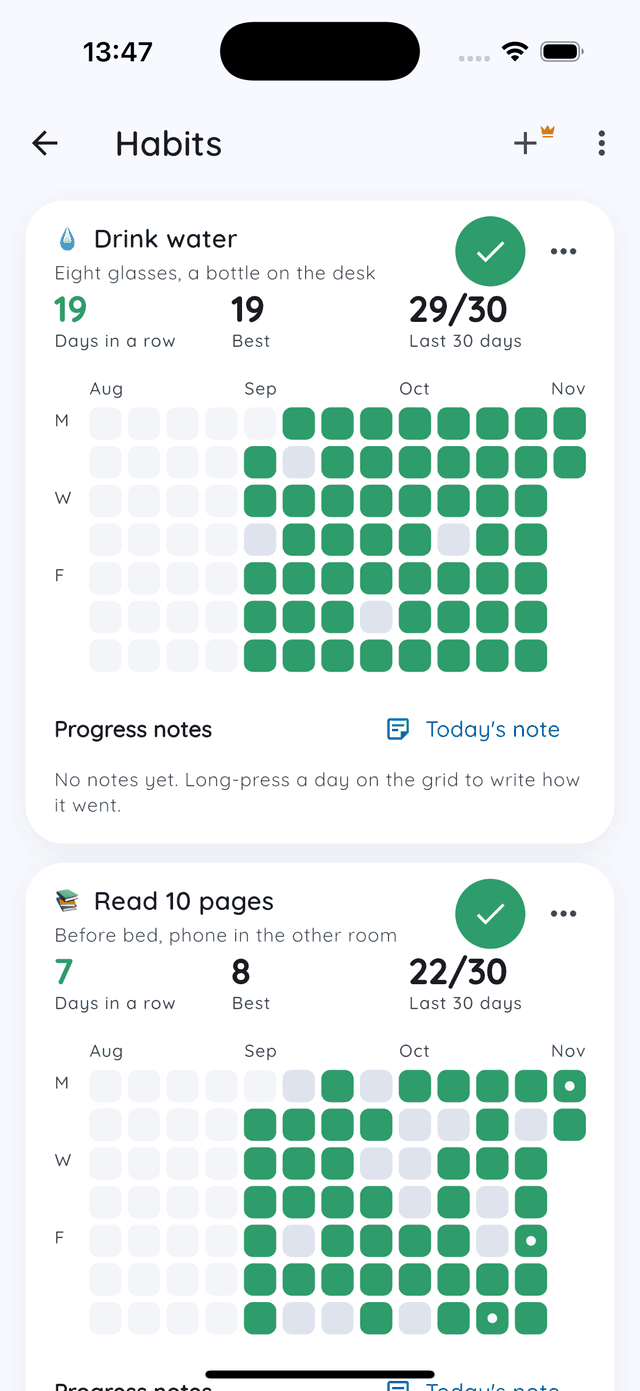
Each habit gets its own card:
- A big check button for today. One tap.
- Three numbers: Days in a row, your Best run, and how many of the Last 30 days you did it.
- A grid of your weeks, one square per day, so the pattern is visible at a glance. Tap any day to check it off (or undo it) if you forgot to tap at the time.
- Progress notes. Long-press a day on the grid to write how it went. Your notes collect under the card, so you can scroll back through them later.
Habits on Home and in your entries
You don't have to open the Habits screen every day. Today's habits sit on the Home screen right under your journaling streak, so you can tick them on the way to writing.
They also show up at the top of an entry. The section folds down to one line, your habit emojis lighting up as you tick them, with a count like 1/3, so it never gets in the way of writing. Tick a habit there and it counts for the entry's date, which means an entry you write the next morning about yesterday ticks yesterday. If you'd rather keep entries just for writing, turn off Show habits in entries.
When you miss a day
You will miss days. Here's what happens in Daykept when you do:
- Your streak doesn't read zero every morning. Until you've ticked today, Days in a row counts up to yesterday. You have the whole day.
- A miss does end the run, but it doesn't erase anything. Your Best stays, and Last 30 days barely moves: 29 out of 30 is still a great month.
- That's the number to watch. Days in a row is fragile by design. "Most days, most months" is what actually changes your life, and the last-30-days count shows exactly that.
The writing streak on Home works a little differently and is gentler still: it has grace days, so a single missed day doesn't break it. More on that in how to start a daily journaling habit.
Letting a habit go
Sometimes a habit is done because it stuck, sometimes because it stopped mattering. Either way, archive it rather than deleting it. Archived habits leave your list but keep their whole history: every check-in and every note. Deleting removes those for good.
Make it part of a weekly look back
Once a week, open Habits and read your progress notes alongside your entries. Which days were easy? What was different about them? If you already do a weekly review, add one question to it: which habit felt easiest this week, and why?
FAQ
Is it free? Yes. Habits are free, and writing in Daykept is free forever.
Do I have to write a journal entry to track a habit? No. You can tick habits from the Home screen or the Habits screen without writing anything.
Can I check off a day I forgot? Yes. Tap that day on the habit's grid. Tap it again to undo.
What happens to my habits if I stop one? Archive it and its history stays. Only deleting a habit removes its check-ins and notes.
Try Daykept, a gentle journal built around how you feel
Free to download. Writing is free forever. No account needed to start.
Learn more →