Daykept vs Day One: a Day One alternative that starts with how you feel
Day One is the most complete journal app. Daykept is smaller and mood-first, with prompts and free templates. What each does better, and how to import.
Day One is the most complete journal app around: end-to-end encryption, apps for iPhone, iPad, Mac and Apple Watch, photos, video, maps, weather and printed books. Daykept is deliberately smaller. It starts every entry with how you feel, helps you start writing with prompts and free templates, and shows your moods back to you over time.
If you use Day One's depth (media, maps, encryption, the Mac app), Daykept won't replace it. If you mostly write short entries and want something lighter and more focused on feelings, Daykept can import your Day One journal and take it from there.
At a glance
| Daykept | Day One | |
|---|---|---|
| Core idea | Mood-first journal: pick a feeling, then write | Full-featured journal: text, media, places, metadata |
| Mood on every entry | ✓ 50 emotions in 6 groups, mood calendar | Not listed on its store page |
| Prompts & templates | 200+ daily prompts; 47 templates, 14 free | Daily prompts; customizable templates |
| Several journals | Notebooks, free | "Different journals", marked as Premium on its store page |
| Photos, audio, video | Photos free; voice journal Premium · free during early access; no video | Photos, video, audio + transcription; unlimited with Premium |
| Looking back | On This Day, mood calendar, Report, Notebook Timeline (Premium · free during early access) | On This Day, calendar, map view, print a book |
| Cycle × mood | ✓ Mark your period on the mood calendar; mood across your cycle (Premium · free during early access) | Not listed |
| Privacy | No account needed to start; optional sync; PIN / Face ID / fingerprint lock. No end-to-end encryption | End-to-end encryption; passcode / Touch ID / Face ID |
| Platforms | iOS, Android | iPhone, iPad, Mac, Apple Watch, Android |
| Export | Daykept Backup, Markdown | PDF, plain text and more |
| Moving your journal | Imports Day One JSON exports | Not applicable |
We make Daykept. The Day One column comes from its official App Store listing, checked September 27, 2026.
Where Day One is the better fit
- You need end-to-end encryption. Day One offers it; Daykept doesn't.
- You journal on a Mac, iPad or Apple Watch, or want entries by email or text message.
- Your journal is photos, video and places: maps, weather, Instagram import, a printed book at the end of the year.
Where Daykept is the better fit
- Your feelings are the point. Every entry starts with a mood, and your month shows up as a mood calendar. Report and a weekly recap show the patterns without rereading.
- You want the basics free. Writing is free forever, with notebooks, tags, photos, reminders, a home screen widget, app lock and full export. Fourteen templates are free, including every template for hard days like the Unsent Letter and Anxiety Release.
- You want help starting. Today's question waits on Home and in every blank entry.
- You want your cycle and your moods side by side: see mood and your menstrual cycle.
Bringing your Day One journal
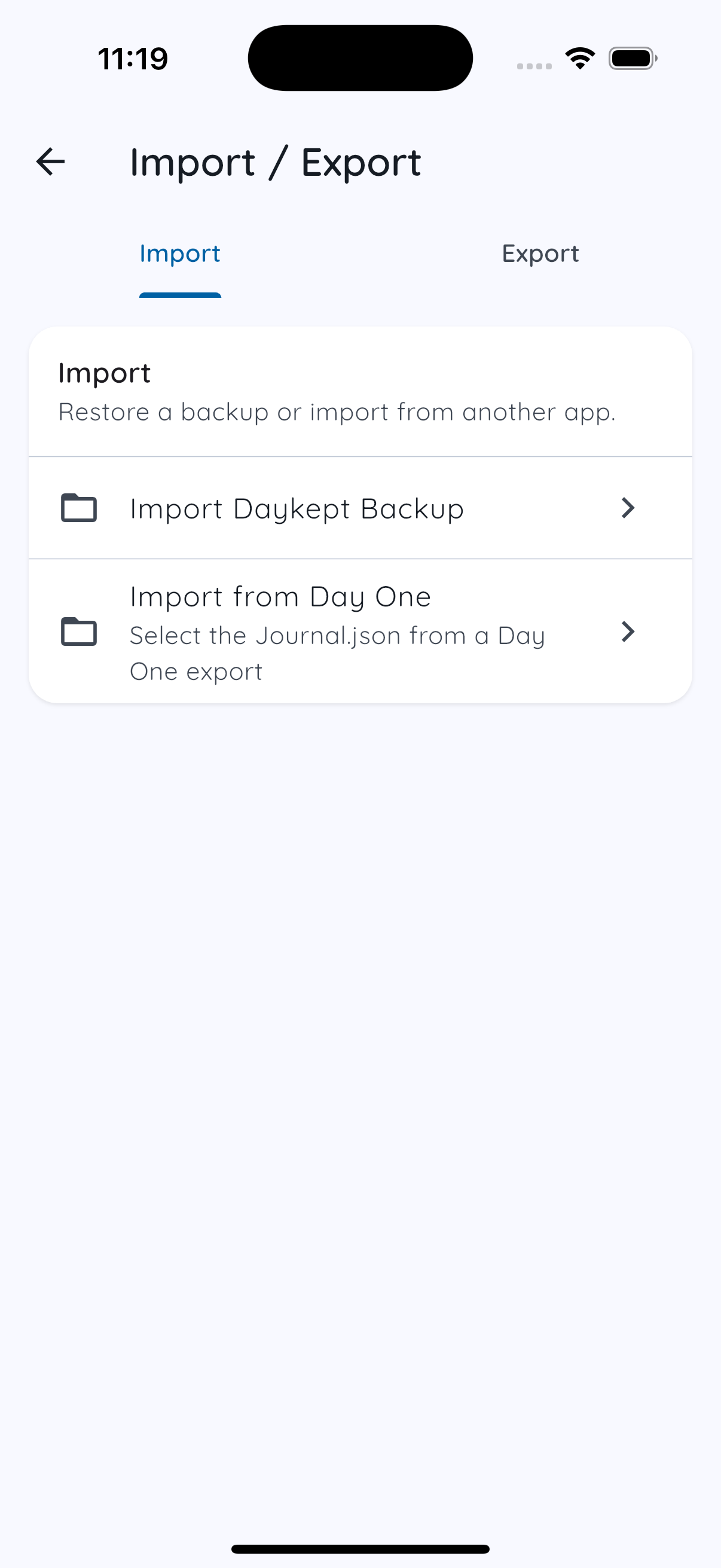
Export your journal from Day One as JSON, then in Daykept go to Settings → Import / Export → Import from Day One and pick
the .json file. Text, titles, dates, stars and tags come across; photos, audio, location and weather don't. Full steps:
how to import your Day One journal.
You can export everything from Daykept again anytime, as a Daykept Backup or Markdown, so your journal stays portable either way.
Frequently asked questions
Can Daykept import my Day One journal?
Yes. Export it from Day One as JSON and use Import from Day One in Daykept. Text, titles, dates, starred entries and tags come across; photos and audio don't.
Is Daykept end-to-end encrypted like Day One?
No. Without an account, your journal stays on your phone; if you turn on sync, entries are stored on Daykept's servers so they reach your other devices, but that sync isn't end-to-end encrypted. If you need end-to-end encryption, Day One offers it.
Does Daykept have a Mac app?
No. Daykept is on iPhone and Android.
Other comparisons
Tracking moods more than writing? See Daykept vs Daylio.
Try Daykept free
Free to download. No account needed to start.