
How to track your net worth without linking a single account
Add up what you own and owe — cash, savings, stocks, crypto, home, car, loans — and watch it change month by month, without handing over any bank logins.
Net worth is one number: everything you own minus everything you owe. It's the best single measure of whether your money is moving in the right direction — and most people have never actually added it up, because the pieces live in five different places.
Most net worth apps solve that by asking for every bank and brokerage login. If you'd rather not, you can still track it accurately. Here's how to calculate it, how often to update it, and how to keep it without linking anything.
How to calculate your net worth
1. List what you own (assets).
- Cash and everyday accounts — checking, cash in your wallet.
- Savings — emergency fund, high-yield savings, deposits.
- Investments — brokerage and retirement accounts, crypto, gold.
- Things with resale value — your home, your car.
2. List what you owe (debts).
- Credit card balances.
- Mortgage, car loan, student loans, personal loans.
- Money you borrowed from family or friends.
3. Subtract. Assets minus debts is your net worth. It can be negative — early in a career, with student loans or a new mortgage, it often is. What matters is the direction over months, not the number on day one.
| Example | Amount |
|---|---|
| Checking + cash | $15,800 |
| Savings | $16,100 |
| Brokerage + crypto + gold | $51,500 |
| Home (estimated value) | $405,000 |
| Car | $30,000 |
| You own | $518,400 |
| Mortgage | −$280,000 |
| Car loan + credit card | −$12,800 |
| You owe | −$292,800 |
| Net worth | $225,600 |
(Example numbers — use your own.)
Values you type in are good enough
Linked accounts update themselves; manual values don't. That sounds like a weakness, but for net worth it mostly isn't:
- Your home and car don't have a live price anyway. An estimate you update once or twice a year is as accurate as it gets.
- Investments move daily, but net worth is a monthly number. Updating them once a month captures the trend.
- Cash, savings and cards change with every transaction — so log those, and the balances stay current.
A 15-minute monthly routine — update investment values, check the total — is all it takes.
When linking accounts is the better choice
If you have many brokerage and retirement accounts, trade often, and want daily balances without typing, an app that connects to your accounts will save you time. Manual tracking suits people with a handful of accounts who care about the monthly trend and would rather not share their logins.
Tracking net worth in Cashvelope
Cashvelope's Accounts page (Home → Accounts) puts it all on one screen: your net worth, what you own and what you owe, and how it changed since last month.
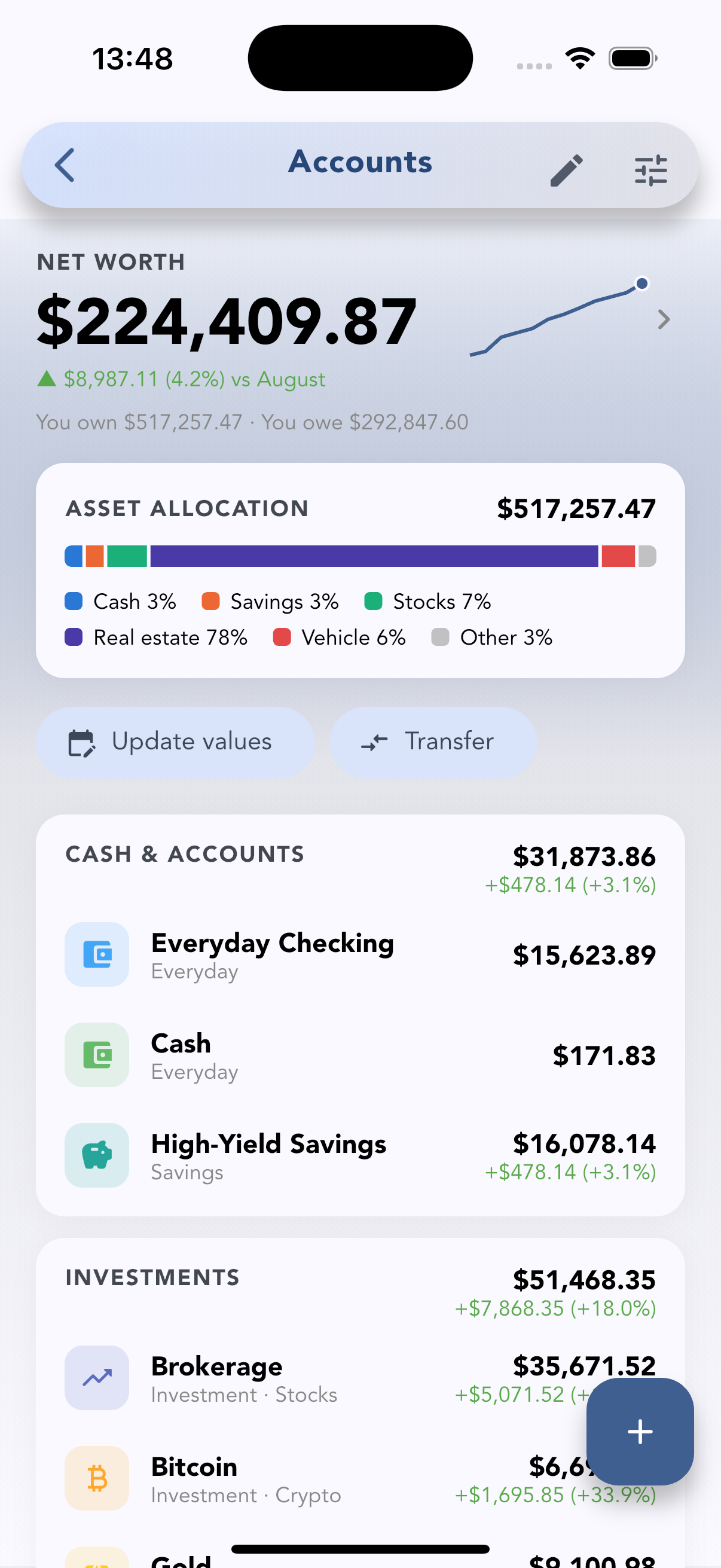
- Asset allocation — a single bar showing how your wealth splits between cash, savings, stocks, real estate, vehicles and other assets.
- Grouped accounts — Cash & accounts, Investments, Other assets and Debts, each with its total.
- Add anything you own. Tap + and choose what to add: an everyday account, savings, stocks, crypto, gold, property, a car, a credit card or a loan. For investments you can enter the purchase price (optional) so gains are counted from what you paid.
- Update values in one sheet. Update values lists every investment and savings account so you can type in today's values in one go; accounts not updated this month are highlighted. Value changes aren't counted as income or spending, so your budgets stay clean.
- Gain and loss per investment — what you put in versus what it's worth now. Money you add or take out isn't counted as gain.
- Transfers move money between your accounts — to savings, to a brokerage, or paying down a card — without showing up as spending.
- Multiple currencies — each account can have its own; totals use today's exchange rates.
- Leave out what isn't yours — uncheck a shared fund or a work card so it doesn't count.
- Net worth widget for your home screen (iOS and Android).
Net worth history shows 3 months free, 12 months with Pro, and the 12-month value chart for each investment is also Pro · free during early access. History appears from your second month of tracking.
What Cashvelope doesn't do: fetch stock or crypto prices, or connect to your bank or brokerage. Every value is one you enter — which is also why you'll actually know what's in there.
A monthly net worth routine
- On the first of the month, open Update values and enter your investment balances.
- Check the change vs last month. Up or down, ask why — a market move, paying down debt, or spending?
- Once or twice a year, update your home and car estimates.
Pair it with your monthly spending picture in the report, and if you're new to manual tracking, read budgeting without linking your bank.
FAQ
Should I include my home in my net worth? Yes, at a realistic resale value, with the mortgage as a debt. If you want a "liquid" view too, look at the Cash & accounts and Investments groups on their own.
Should I include my car? Include it and update its value once or twice a year — cars lose value, and seeing that is useful when deciding what to buy next.
How often should I update my net worth? Monthly. Daily changes are mostly market noise; the monthly trend is what tells you something.
Is it safe to track net worth in an app without linking accounts? You only store numbers you type in — no bank or brokerage logins. In Cashvelope you don't need an account to start, and sync is optional.