Budgeting without linking your bank: how manual tracking works (and when it doesn't)
Why some people budget better by logging spending themselves, how to keep it to a few seconds a day, and when bank sync is the better choice.
Most modern budget apps start by asking for your bank login. For a lot of people that's the right call: transactions appear on their own and nothing gets forgotten. But plenty of people try it, watch the numbers pile up, and still overspend — or don't want to hand their banking access to a third party at all.
Budgeting without a bank connection sounds like more work. Done well, it's a few seconds per purchase, and it can change your spending more than automation does. Here's how it works, how to keep it fast, and when you're better off with sync.
Why typing it in can work better
You notice the number. Paying by card separates the fun of buying from the cost, which shows up later on a statement. Behavioral economists have found people are willing to spend more for the same thing when paying by card. Typing "$38" into your phone right after dinner puts a little of that cost back.
It happens at the decision, not after it. Synced transactions arrive later, sometimes days later, and then need categorizing. By the time you see them, the decision is long over. A manual entry is up to date the moment you save it.
There's nothing to disconnect. Bank connections go through aggregators that break when a bank changes its login or security steps. Manual tracking has no connection to maintain — and nothing to re-authorize.
Privacy. No third party holds access to your bank account on your behalf.
When bank sync is the better choice
Be honest with yourself here:
- You won't log consistently. A budget with half the transactions missing is worse than an automated one — it tells you everything is fine when it isn't.
- You have many accounts and lots of small card transactions and mainly want an accurate record, not a spending brake.
- Your bank is well supported in your country and you're comfortable with the access.
If that's you, pick a sync app. Manual tracking is a tool for changing behavior, not a virtue.
How to keep manual tracking to seconds a day
1. Log at the counter, not at night. The longer you wait, the more you forget. Make it part of paying: card goes back in the wallet, phone comes out, three taps.
2. Keep an entry minimal. Amount and category. Notes, photos and exact times are optional — add them only when they'll matter later.
3. Let recurring bills log themselves. Rent, phone, insurance and subscriptions are a big share of most people's spending and rarely change. Set them up once so they record on their own; you only type the flexible spending.
4. Watch only a few categories closely. Log everything, but only put limits on the two or three categories that actually leak — usually eating out, shopping and fun. See digital cash envelopes for how.
5. Catch up with a statement, not memory. Missed a few days? Don't reconstruct them from memory — open your card statement and add what's missing, or import it as a CSV.
Doing this in Cashvelope
Cashvelope was built for this way of budgeting: it doesn't connect to banks at all.
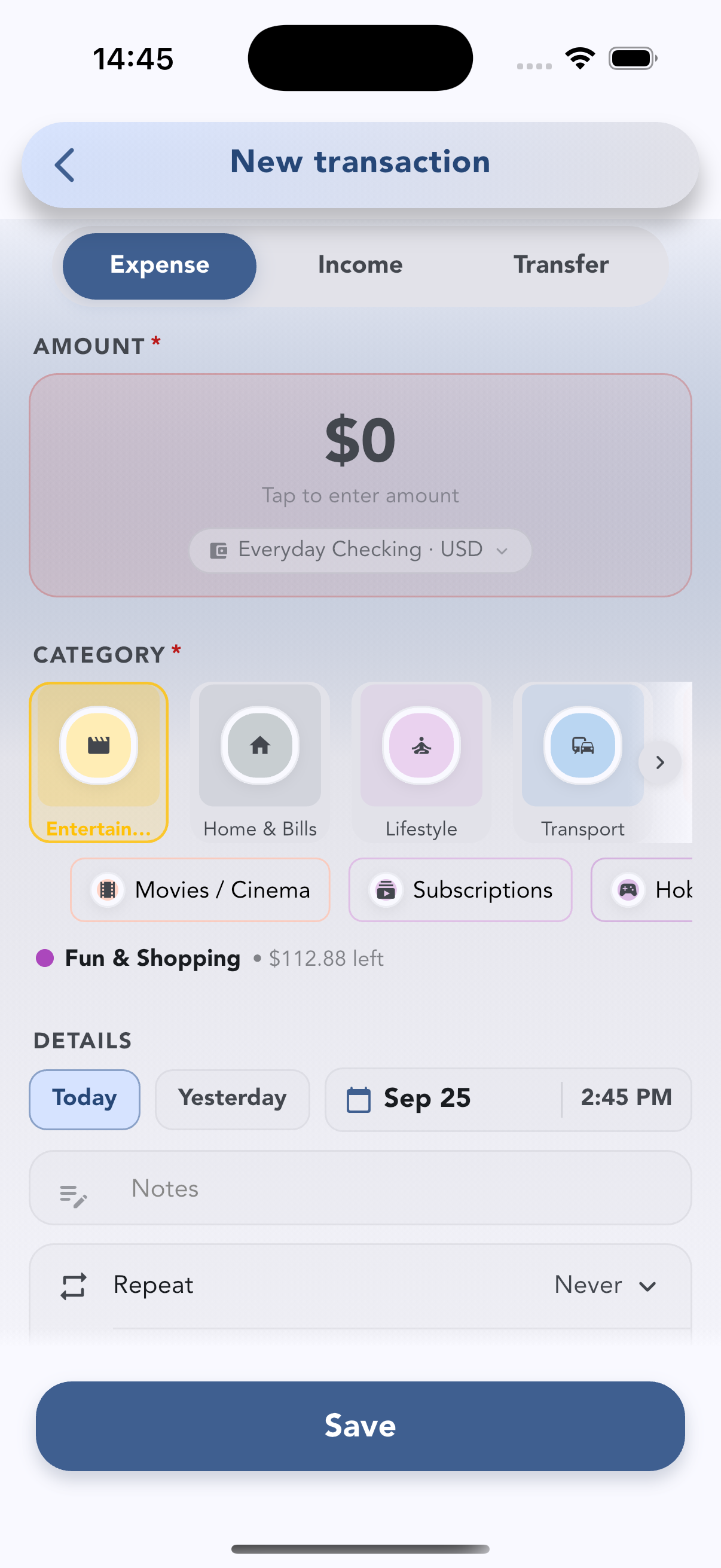
- Fast entry. Amount, category, save. Cashvelope suggests the category you usually pick at this time of day and keeps your recent categories at the front.
- Home screen widgets (iOS and Android) that jump straight to a new entry.
- Recurring transactions that record themselves on the due date, or wait for you to confirm when the amount changes.
- CSV import with column mapping, a preset for Mint exports, and duplicate detection — useful for moving from another app or catching up from a bank statement.
- No account needed to start. Sync across devices is optional; export your data anytime.
It's free to download, with no ads. For a walkthrough of the entry screen, see how to log an expense.
FAQ
Is manual budgeting accurate? As accurate as your logging. Most people who stick with it log at the moment of payment and let recurring bills record themselves, so there's little left to forget.
What if I forget to log for a week? Open your statement and add the missing transactions, or import them as a CSV. Don't restart from scratch.
Can I use manual tracking with a credit card? Yes. Log card purchases the same way as cash. When the card bill is paid, that's a payment from your checking account, not new spending.
Is it safe to store my spending in an app without a bank connection? You're only storing what you type in. In Cashvelope you don't need an account to start, and if you turn on sync, your data goes to your own Cashvelope account. The app has no ads and doesn't sell your data.