How to find every subscription you pay for — and what they cost in a year
A 15-minute audit to find forgotten subscriptions, add up the yearly cost, and decide what to cancel — plus how to keep the list from growing back.
Subscriptions are easy to start and easy to forget. Each one looks small on its own — a few dollars here, fifteen there — so they rarely get the attention a single large purchase would. Add them up for a year, though, and the total is often the most surprising number in a budget.
Here's a 15-minute audit to find them all, a simple way to decide what stays, and a habit that keeps the list from quietly growing back.
Step 1: Pull three months of statements
Open your card and bank statements for the last three months and list everything that shows up every month or every week. Include the small ones: cloud storage, an app you pay for inside the App Store or Google Play, a newspaper, a phone insurance add-on.
Three months is enough to catch anything monthly or weekly. It won't catch plans billed once a year — that's the next step.
Step 2: Search your email for the rest
Annual plans are the ones people forget most, because they only appear once. Search your inbox for:
- "receipt" and "your receipt from"
- "renewal", "renews on", "auto-renew"
- "free trial" and "trial ends"
- "your plan" and "subscription"
Also check the subscription settings in your phone's app store — that list is often longer than people expect.
Step 3: Write the yearly cost next to each one
This is the step that changes decisions. A monthly price hides the real cost; the yearly number doesn't.
| Example subscription | Monthly | Per year |
|---|---|---|
| Video streaming | $15.49 | $185.88 |
| Music | $10.99 | $131.88 |
| Cloud storage | $2.99 | $35.88 |
| Gym | $35.00 | $420.00 |
| Meal-kit add-on | $12.00 | $144.00 |
| Total | $76.47 | $917.64 |
(Example numbers — use your own.)
For anything billed weekly, multiply by 52. For quarterly, by 4.
Step 4: Keep, downgrade or cancel
Go down the list and ask one question per line: did I use this in the last 30 days?
- Used it and would pay again today: keep.
- Used it, but not enough for the price: look for a cheaper tier, a family plan you can share, or an annual plan if you're sure you'll keep it.
- Didn't use it: cancel. If you're unsure, cancel anyway — most services make it easy to come back.
Cancel right away while you're motivated. A to-do that says "cancel later" tends to renew first.
Step 5: Put renewal dates where you'll see them
Free trials and annual plans are where money leaks. For each one you keep, note the next renewal date and set a reminder a few days before — enough time to decide calmly instead of discovering the charge afterwards.
Keep the list honest
The audit is the easy part. The list grows back one "just trying it" signup at a time. Two habits help:
- Add a subscription to your list the moment you sign up, including trials, with the date it will start charging.
- Look at the yearly total once a month — the first of the month is a natural time.
Doing this in Cashvelope
In Cashvelope, subscriptions and recurring bills live on one Subscriptions page, with what you pay per month and roughly per year at the top, and the next payments listed by date.
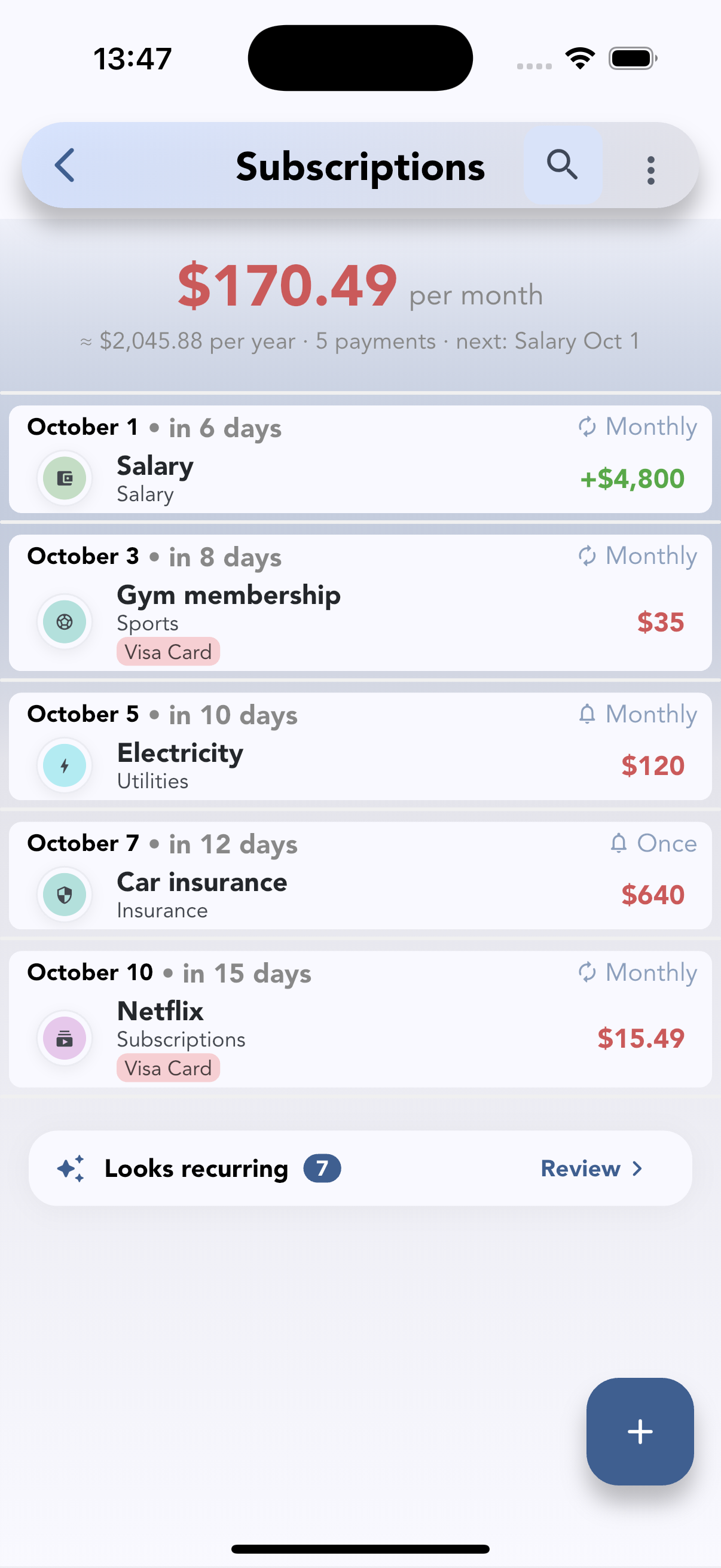
- Add each subscription as a recurring transaction and choose how often it repeats. You can let it record itself on the due date, or wait for you to confirm — handy for bills that change every month.
- Turn on reminders before renewals (same day, 1, 3 or 7 days before) and on the due date, plus one more if a payment is overdue.
- Filter and sort the list by account or category, and skip a single payment without deleting the schedule.
- If you create the same schedule twice, Cashvelope warns you.
- Looks recurring: Cashvelope checks your last three months for charges that repeat weekly, every two weeks or monthly and lists them under Looks recurring — tap Review to turn one into a subscription or dismiss it. It doesn't catch plans billed once a year, so keep step 2 of the audit.
There's no bank connection — the subscriptions come from what you log, which is also what makes you look at each one. Cashvelope is free to download, with no ads.
If you want a limit on everyday spending too, see digital cash envelopes, and if you're wondering whether manual tracking is worth it, read budgeting without linking your bank.
FAQ
How often should I audit my subscriptions? A full audit twice a year is plenty if you check the yearly total once a month. Do an extra one after the holidays, when trials from gifts and sales start charging.
Should I switch to annual billing to save money? Only for services you've used steadily for months. Annual plans are cheaper per month but are the easiest to forget — put the renewal date in a reminder the day you pay.
What counts as a subscription? Anything that charges you automatically on a schedule: streaming, apps, memberships, insurance paid monthly, software, delivery passes. Rent and utilities are recurring too — tracking them in the same place shows your fixed costs in one view.