Digital cash envelopes: how to do cash stuffing without carrying cash
Keep what makes cash stuffing work — a visible, limited amount per category — and move it to your phone. Setup, rules, and what the digital version doesn't do.
Cash stuffing works for a simple reason: you can see the money. A food envelope with $40 left in it is impossible to ignore. When it's empty, you're done — no "I'll make up for it next month."
The trouble is the cash. Most bills are paid online, many shops prefer cards, and carrying a binder of envelopes isn't practical for everyone. The good news: the part that makes the method work isn't the paper. It's three rules you can keep on your phone.
What makes cash envelopes work
- A fixed amount per category, decided in advance. Not a guess at the end of the month — a number before you spend.
- You can see what's left. Every purchase visibly shrinks the envelope.
- Empty means empty. You don't borrow from rent or savings. You wait for the next period.
A digital version works as long as it keeps all three. If you can't see what's left before you pay, it's just an expense tracker.
Setting up digital envelopes
1. Pick three to five envelopes. Only the categories where money leaks: eating out, groceries, fun money, shopping, getting around. Fixed bills (rent, utilities, insurance, loan payments) don't need an envelope — they're the same every month. Twenty envelopes on day one is how people quit in week three.
2. Set the amount from real numbers. Look at what you actually spent in each category over the last two or three months, then set the limit a little below the average. A limit you blow on day 10 teaches you nothing.
3. Match the period to your pay. Paid weekly or every two weeks? Weekly envelopes line up with your paycheck better than monthly ones.
4. Split a big envelope if it helps. A $600 food envelope can be broken into groceries, dining out and coffee, each with its own share — in dollars or as a percentage of the total.
The rules that make it stick
- Check before you pay. Glance at what's left before the checkout, not after. That's the whole point.
- Divide by the days left. "$60 left" is abstract; "$10 a day for six days" is a decision you can make at the café door.
- The day-20 rule. If an envelope is empty on the 20th, it's empty until it refills. Pantry meals for ten days are annoying — and they change how you spend in the first ten days of next month.
- Use a separate envelope for one-off events. A trip or a wedding shouldn't eat your monthly food money. Give it its own envelope that only counts what you spend for that event.
What a digital version usually doesn't do
Be clear about which method you want:
- Splitting your paycheck into envelopes (every dollar assigned, "zero-based" budgeting) is a different, stricter system. Apps built for it exist; many simpler envelope apps — including the one below — don't do it. They set spending limits instead.
- Rolling leftovers over. In paper envelopes, leftover cash stays in the envelope. In many apps, each period starts fresh. If you want a bigger envelope after a good month, raise the limit yourself.
Doing this in Cashvelope
In Cashvelope, each budget works like an envelope: a spending limit for one or more categories that shows what you've spent, what's left, and your daily pace.
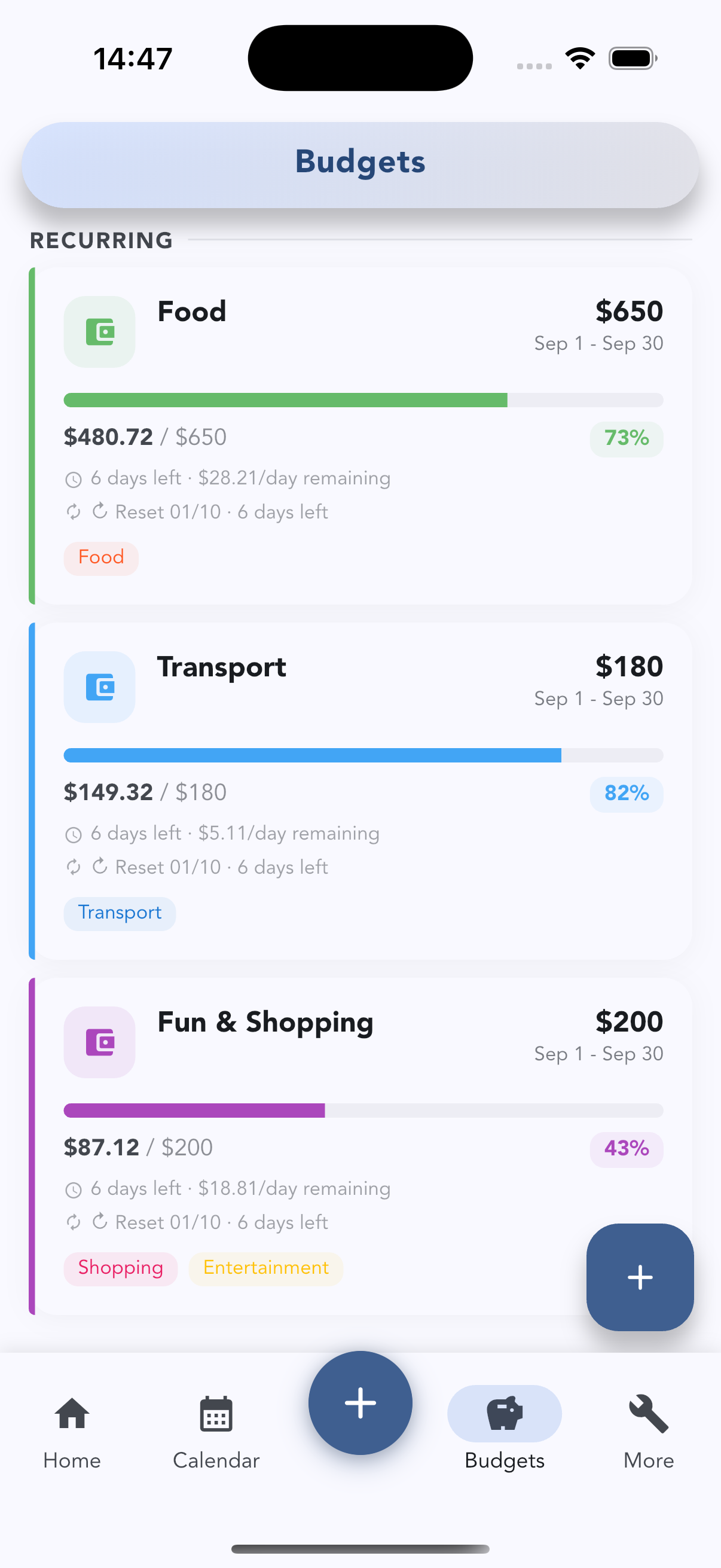
- Choose the period — weekly, monthly, yearly or custom. You set a budget up once; it resets itself every period, so there's no need to create a new one each month.
- Split a budget into spending goals per category, as an amount or a percentage of the total.
- Create trip and event budgets that only count the transactions you add to them.
- Open a budget and it leads with Left to spend, whether you're ahead of an even pace, and "$28 a day for the next 6 days keeps you on budget" — the "divide by the days left" rule, done for you.
- Up to five active budgets are free — enough for the three-to-five-envelope setup above.
There's no bank connection and no ads. For a full walkthrough of the budget screen, see how budgets work in Cashvelope. For more on logging quickly, see budgeting without linking your bank; to stop subscriptions from eating your envelopes, try the subscription audit.
FAQ
How many envelopes should I have? Three to five for the categories that leak. Log everything else without a limit. You can add more once checking before you pay has become a habit.
What happens when an envelope runs out early? Stop spending in that category until it refills. If it happens every month, the limit is unrealistic — raise it a little and lower another one.
Is digital cash stuffing as effective as cash? It can be, if you really look at what's left before paying. The risk is treating the app as a record you check at the end of the month; the envelopes only work if they're part of the decision.